AI automation / NEWS ANALYSIS
OpenAI Decisions API: Faster Choices for AI Workflows
OpenAI’s Decisions API enters public beta with typed answers for classifying content, routing requests and guiding AI workflows from text or image inputs.
WATCH THE PRIMARY SOURCE
Introducing the Decisions API
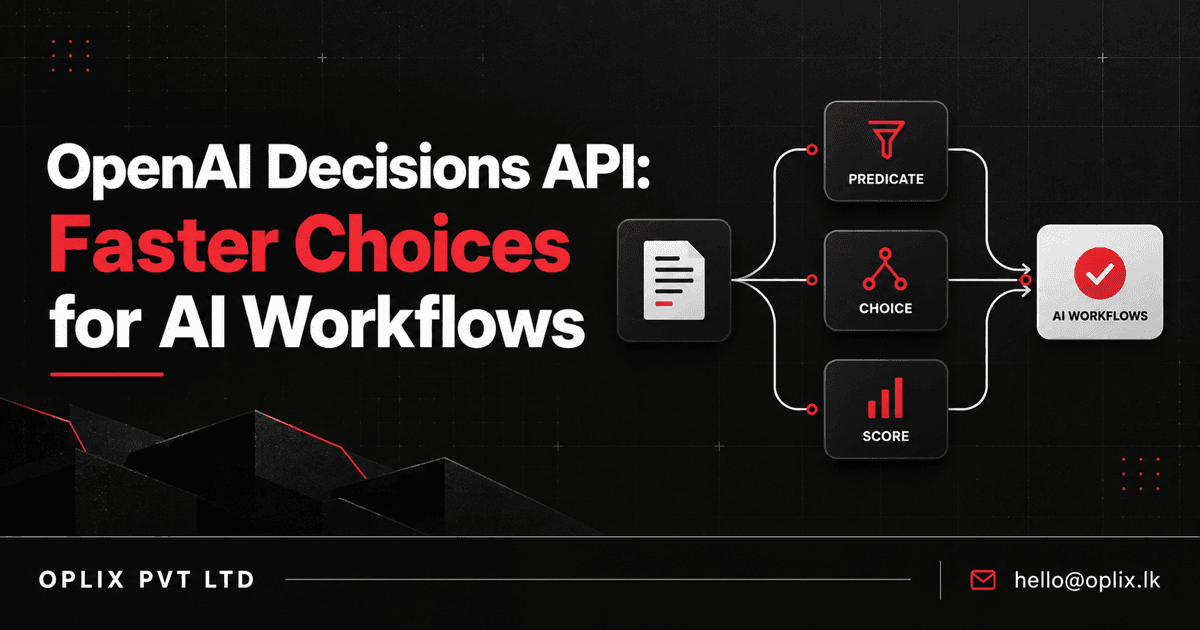
OpenAI’s Decisions API entered public beta on October 6, 2026, giving developers a dedicated way to turn text, images, or both into typed answers their applications can act on. Instead of asking a general-purpose model for an open-ended response, an app can define a predicate, choose from a fixed set of options, or score an input against a rubric. OpenAI says the endpoint returns these decisions about 10 times faster than the Responses API; that is the company’s comparison, not a guarantee for every workload.
The practical idea is simple: give an AI application a bounded decision to make, provide the evidence it should use, and receive an answer in a form the surrounding software can handle. For businesses building AI assistants or automated processes, that can make tasks like triaging requests, classifying incoming material, or selecting an allowed next step easier to connect to application logic. The API supplies a model response—not the complete workflow, business rules, or approval process.
What is the Decisions API?
The Decisions API is a dedicated OpenAI endpoint, POST /v1/decisions, for evaluating text and image inputs against questions defined by the developer. OpenAI’s documentation currently lists gpt-6-luna as the only supported model and identifies three question types:
- Predicate: estimate the probability that a stated condition is true—for example, whether a request appears to concern billing.
- Choice: select from options supplied by the application, such as routing a support request to one of a defined set of teams.
- Score: evaluate input against ordered levels in a rubric, such as prioritizing an issue by its described severity.
The request contains shared input and one or more questions, each with its own instructions and, where relevant, choices or score levels. The response returns named answers. Predicate answers include a probability estimate; choice and score answers include probabilities and a confidence field. That typed structure is designed to make the result easier for software to consume than free-form prose.
What changed with the public beta?
OpenAI announced the API at DevDay in a limited preview. Its October 6 video and API documentation now describe it as available in public beta, with a public playground for trying questions and inputs. OpenAI says it expects general availability in the coming weeks; that is a stated expectation, not a confirmed GA date. The release remains a beta, and the documentation currently identifies just one supported model.
OpenAI also describes the endpoint as about 10 times faster than the Responses API for the Decisions task. Treat that as a vendor-reported positioning claim. Actual latency depends on the request, model and application environment, so teams should benchmark their own representative cases before designing around a speed expectation.
Where could it fit in a business application?
The API is most naturally useful when an application needs a narrow model-assisted judgment and a predictable answer shape. For example, a team could test whether an incoming document meets a defined condition, route a customer request to one of several queues, or score an item against a consistent prioritization rubric. With image input, a workflow could ask a question about an image alongside text context.
These examples are implementation patterns, not turnkey business features. The product team still has to define relevant inputs, create meaningful answer choices or score levels, handle refusals and errors, and decide what the application does with each answer. A model’s probability or confidence is not proof that a classification is correct.
What should teams evaluate before using it?
- Bound the decision. Write a question with observable criteria and distinct allowed outcomes. If the task needs open-ended reasoning, a fixed-answer decision endpoint may not be the right fit.
- Keep deterministic rules deterministic. Use ordinary application code for exact rules such as required fields, permissions, balances, or known thresholds. Reserve model judgment for the parts that genuinely depend on interpreting language or images.
- Test the edge cases. Build a representative evaluation set with ambiguous, incomplete, contradictory, and out-of-scope inputs. Measure false positives and false negatives against the business cost of each error.
- Set a safe fallback. Route low-confidence, refused, or unexpected results to a retry, a neutral “no action” path, or a human reviewer. Do not let a model response silently authorize a consequential action.
- Instrument the workflow. Log the question version, relevant input references, returned answer, downstream action, and any human correction, subject to the organization’s privacy and retention requirements.
OpenAI’s own guidance recommends clear, observable questions, separate questions for separate concerns, and thresholds chosen around the cost of mistakes. That is a useful reminder: a fast structured response can simplify an integration, but it does not remove the need to test how the whole system behaves.
What this means for AI automation projects
The Decisions API is a specialized building block, not a replacement for every model call. Its value is clearest when an application needs a bounded classification, selection, or score and can use that result to move a process forward. Developers should compare it with their existing approach using real inputs, while accounting for beta status, the currently documented model limit, latency, accuracy, and fallback behavior.
For an organization, the key design work remains deciding what information a system may use, what actions are allowed, how exceptions are reviewed, and how outcomes are measured. Those choices matter whether the model is called through a dedicated decision endpoint or another API.
How Oplix can help
Oplix can help scope an AI assistant, automation workflow, or custom software integration around a real business process—including its data boundaries, validation rules, exception paths, and human review points. If your team is exploring where structured AI decisions could fit, talk with Oplix about a focused workflow.
Primary sources
Primary sources
TURN THE UPDATE INTO A USEFUL SYSTEM
How Oplix can help
Explore the services directly related to this development.
AI Development
Custom AI agents, assistants and product features connected to your data, tools and business workflows.
Explore AI Development →AI Automation
Connect business tools, process information, qualify leads, trigger actions, and draft communications—with people in control when judgment matters.
Explore AI Automation →Software Development
Custom dashboards, portals, mobile apps, internal tools, APIs, and SaaS products shaped around how your business actually operates.
Explore Software Development →